If you’ve ever searched for a subtitle generator online free, you already know the struggle: slow browser tools that crash on large files, clunky timelines, watermarked exports — and then a paywall the moment you need something useful. The good news? You don’t need a desktop app or a complicated online editor to add perfect subtitles to your videos in 2025.
This guide covers everything you need to know about generating subtitles for free — and introduces a faster, cleaner alternative that lives right on your phone.
Why Subtitles Matter More Than Ever
The numbers speak for themselves. 85% of social media videos are watched without sound — whether that’s someone scrolling through Instagram on the bus or someone watching a TikTok in bed at midnight. Without captions, you’re losing most of your audience before they even hear your message.
- Subtitled videos get up to 35% more engagement on social media
- Captions increase watch time and reduce bounce rate on platforms like YouTube
- Over 466 million people worldwide live with hearing loss — captions make your content accessible to all of them
- Subtitles dramatically improve SEO: search engines can index your transcript, not just your video title
| Quick fact: Adding subtitles to your videos can increase CTA (call-to-action) clicks by up to 26% compared to the same video without captions. That’s not a small difference — that’s a conversion multiplier. |
What to Look for in a Free Subtitle Generator
Not all subtitle tools are created equal. Before you sign up for the first tool that shows up in your search results, here’s what actually matters:
1. Accuracy of AI Transcription
The whole point of an auto subtitle generator is to save you time. If the AI misses every third word, you’ll spend more time editing than you saved. Look for tools that support your language natively and handle natural speech — not just clean studio audio.
2. Language Support
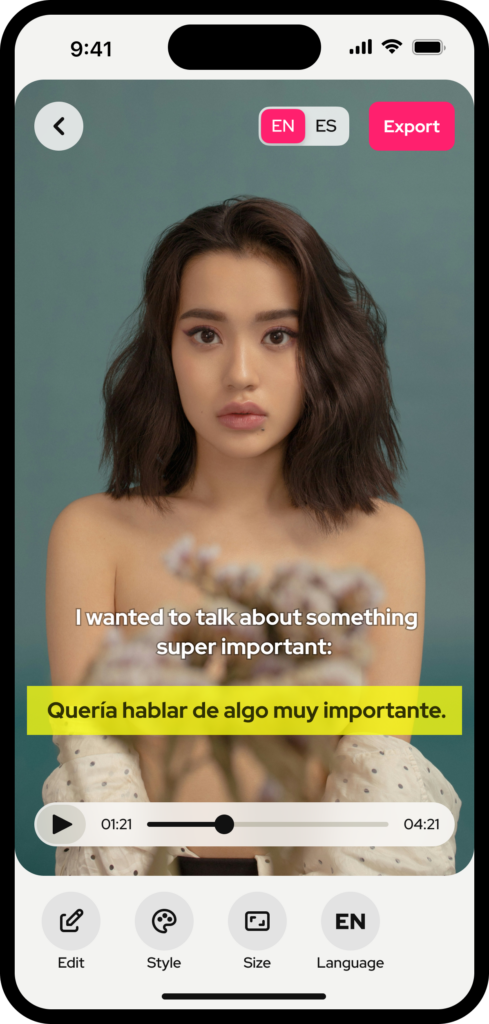
If your audience is global (or if you ever want it to be), multilingual subtitle support is non-negotiable. A good subtitle tool should be able to transcribe your video AND translate it into other languages in the same workflow.
3. Export Flexibility
SRT file export is the gold standard. SRT files are compatible with YouTube, Vimeo, Zoom, and virtually every platform. Burning subtitles directly into the video (“hardcoding”) is also useful for Instagram Reels, TikTok, and Stories where external subtitle files aren’t supported.
4. Clean, Accessible Design
Flashy animated captions that bounce and spin might look fun, but they actively hurt accessibility for viewers with visual processing issues or hearing impairments who rely on captions to follow along. Clean, readable subtitles that stay in place are not boring — they’re professional.
5. Works on Mobile
Most content creators aren’t sitting at a desktop editing suite. They shoot on their phone, they edit on their phone, and they post from their phone. Your subtitle tool should fit that workflow, not fight it.
Why Most Browser-Based Subtitle Generators Fall Short
You’ve probably tried a few. Here’s what you’ve likely run into:
- Upload takes forever for videos over 100MB
- The free plan only exports with a watermark — or exports nothing at all
- The editor is clunky and hard to use on a phone screen
- Auto-captions require you to be on a desktop browser
- Pricing kicks in after your very first video
Web-based tools are useful for quick edits — but for a creator who makes multiple videos a week, a mobile-first subtitle app is faster, simpler, and fits your natural workflow.
Meet Subcap: The Auto Caption App Built for Creators
Subcap is a mobile app (available on iOS and Android) that automatically generates subtitles for your videos using AI — and it does it faster and more accurately than most desktop tools. Here’s what makes it different:
AI-Powered Auto Subtitles
Subcap’s speech-to-text engine uses advanced AI to transcribe your video audio in seconds. Whether you’re speaking English, Turkish, Spanish, German, or one of 125+ supported languages, Subcap gets it right. Record a new video directly in the app, or upload from your phone’s gallery — it works both ways.
Translate Into Any Language
Once your subtitles are generated, you can translate them into a second language and add both subtitle tracks to your video at the same time. Perfect for bilingual audiences, international creators, or anyone trying to grow their reach beyond their native language.
SRT File Support
Already have an SRT file? Import it directly into Subcap and burn it into your video. Or export your generated captions as an SRT file to use on YouTube, Vimeo, or anywhere else. Subcap gives you full control over your subtitle files — no lock-in.
Customizable Fonts, Colors & Positions
Choose from multiple font styles and sizes, adjust caption color and contrast for readability, and position your subtitles anywhere on the screen. Subcap’s designs are intentionally clean — so your captions enhance your video without competing with it.
Designed for Accessibility
Subcap was built on a belief that accessibility is a responsibility, not a feature. That means non-animated, static captions that are easy to read for everyone — including the 466 million people worldwide with hearing loss. When you use Subcap, you’re not just making better content. You’re making content that’s actually inclusive.
| “Subcap is my go-to for captions on all my TikToks.” — Subcap user review |
| “This app is a game changer! I used to spend hours adding captions to all my videos. Now, I can get all this work done in minutes.” — App Store review |
How to Add Subtitles to Your Video With Subcap (Step by Step)
Getting started takes less than two minutes:
- Download Subcap from the App Store or Google Play — it’s free to start.
- Upload your video from your gallery, or record directly in the app.
- Tap ‘Auto Caption’ and let the AI transcribe your audio. It takes seconds.
- Review and edit any captions to make sure every word is right.
- Customize fonts, colors, sizes, and position to match your style.
- Export your video with captions burned in — ready for TikTok, Reels, Shorts, or anywhere you post.
Subcap vs. Browser-Based Subtitle Generators
| Feature | Browser Tools | Subcap (Mobile) |
| Works on mobile | ⚠️ Limited | ✅ Built for it |
| AI auto-transcription | ✅ Yes | ✅ Yes |
| 125+ languages | ⚠️ Varies | ✅ Yes |
| SRT import/export | ✅ Usually | ✅ Yes |
| Subtitle translation | ❌ Rarely | ✅ Yes |
| Accessible (non-animated) captions | ❌ Often animated | ✅ Yes |
| No watermark (paid plan) | ✅ Yes | ✅ Yes |
| Speed | 🐢 Slower | ⚡ Super Fast |
Which Platforms Does Subcap Work Best For?
Subcap is designed for social videos — the content types that grow audiences fastest in 2025:
- TikTok — burn captions into your video before upload; TikTok’s built-in captions often miss words
- Instagram Reels — Instagram doesn’t support external SRT, so burned-in captions are the only way
- YouTube Shorts — export with captions for better accessibility and watch time
- Facebook & LinkedIn video — reach silent scrollers with visible subtitles
- Presentations & tutorials — add subtitles to screen recordings and lecture videos
Frequently Asked Questions
Is Subcap really free?
Subcap offers a free trial so you can try all features before committing. Premium plans unlock unlimited exports without restrictions. There are no surprise paywalls mid-edit.
Can I use Subcap to add subtitles to someone else’s video?
Yes — you can upload any video from your phone’s gallery, not just videos you recorded yourself. Subcap works with MP4 and other common video formats.
What languages does Subcap support?
Subcap supports 125+ languages for both transcription and translation. This includes major languages like English, Spanish, French, German, Portuguese, Turkish, Arabic, Japanese, and many more.
Can I export an SRT file from Subcap?
Yes. Subcap lets you export your captions as an SRT file, which you can upload directly to YouTube, Vimeo, or any platform that accepts external subtitle files.
Does Subcap work without an internet connection?
Core features require an internet connection for AI transcription. Once your video is captioned, you can edit and export offline.
Stop Fighting Your Subtitle Generator Online Tool — Start Using Subcap
Adding subtitles to your videos shouldn’t be a chore. The best subtitle generator is one that fits your workflow, respects your time, and makes your content better — not one that makes you fight a clunky web editor or hit a paywall after your first export.
Subcap was built for exactly this. It’s fast, accurate, supports 125+ languages, exports SRT files, and runs entirely from your phone. Whether you’re a TikTok creator, a business owner posting LinkedIn videos, or a student making lecture recordings more accessible — Subcap does the work so you don’t have to.
| 👉 Download Subcap free — available on the App Store and Google Play. Add subtitles to your first video in seconds. |
Keep Reading:
Captions That Don’t Ruin Your Aesthetic: Subcap’s Clean Designs